Stock adjustments and reasons
An adjustment corrects the stock number at one outlet when nothing else explains the change: breakage, theft, a miscount, or stock you found in the back that was never booked in.
Adjust a product’s stock
Section titled “Adjust a product’s stock”Adjustments are made on the product, because they are always about one product at one outlet.
- Go to Catalog > Products and open the product.
- Go to the Inventory tab. Each outlet has its own section, with its current stock shown beside the heading.
- Select Adjust stock on the outlet you are correcting.
- Pick a Reason. The list shows each reason as Add stock: name or Remove stock: name, and that is what decides the direction.
- Enter a Quantity. It is always a positive whole number, because the reason already says which way it goes.
- Set Adjusted on if the change actually happened on an earlier day, otherwise leave it for today.
- Add a Note if the quantity and the reason do not tell the whole story.
- Select Save adjustment.
The stock changes straight away and the adjustment is recorded with the reason, the date, and your name on it.
You cannot adjust stock below zero. If a removal would take an outlet negative, OLET refuses it. That usually means the count is wrong somewhere earlier rather than here.
A product only has an Inventory tab with outlets on it when Track inventory is on. See How inventory works.
Cost of added stock
Section titled “Cost of added stock”When the reason is an Add stock reason, the dialog shows a Unit cost field under Quantity. It is what each added unit cost you. Remove stock reasons have no cost field, and switching to one clears whatever you typed.
- The field is prefilled with the outlet’s current average cost for that product. Leave it as it is and the average does not change.
- Type a different cost and OLET blends it into the outlet’s average, weighted by how many units you add.
- Leave it blank and OLET uses the outlet’s average cost. If the outlet has no average yet, it uses the supply price from the product’s Details tab. The text under the field tells you which: Blank uses the supply price, $X.XX, or No cost on file. Stock will have no cost when there is no supply price either. A supply price of $0 counts as no cost.
- Once you type a cost, the text reads Blended into this outlet’s average cost.
Removing stock never changes the average. Stock counts have no cost field: units a count finds use the outlet’s average, or the supply price when there is none.
Why the reason matters
Section titled “Why the reason matters”The reason is the point of the adjustment, not paperwork attached to it. A stock number that moved with Damaged in transit on it is a fact you can act on, and it is still readable months later when someone asks what happened to those six units.
Keep the list short and specific. A list with one reason called Adjustment on it tells you nothing, and a list of thirty tells you nothing either because nobody picks the right one.
Manage the reason list
Section titled “Manage the reason list”Go to Inventory > Adjustment reasons.
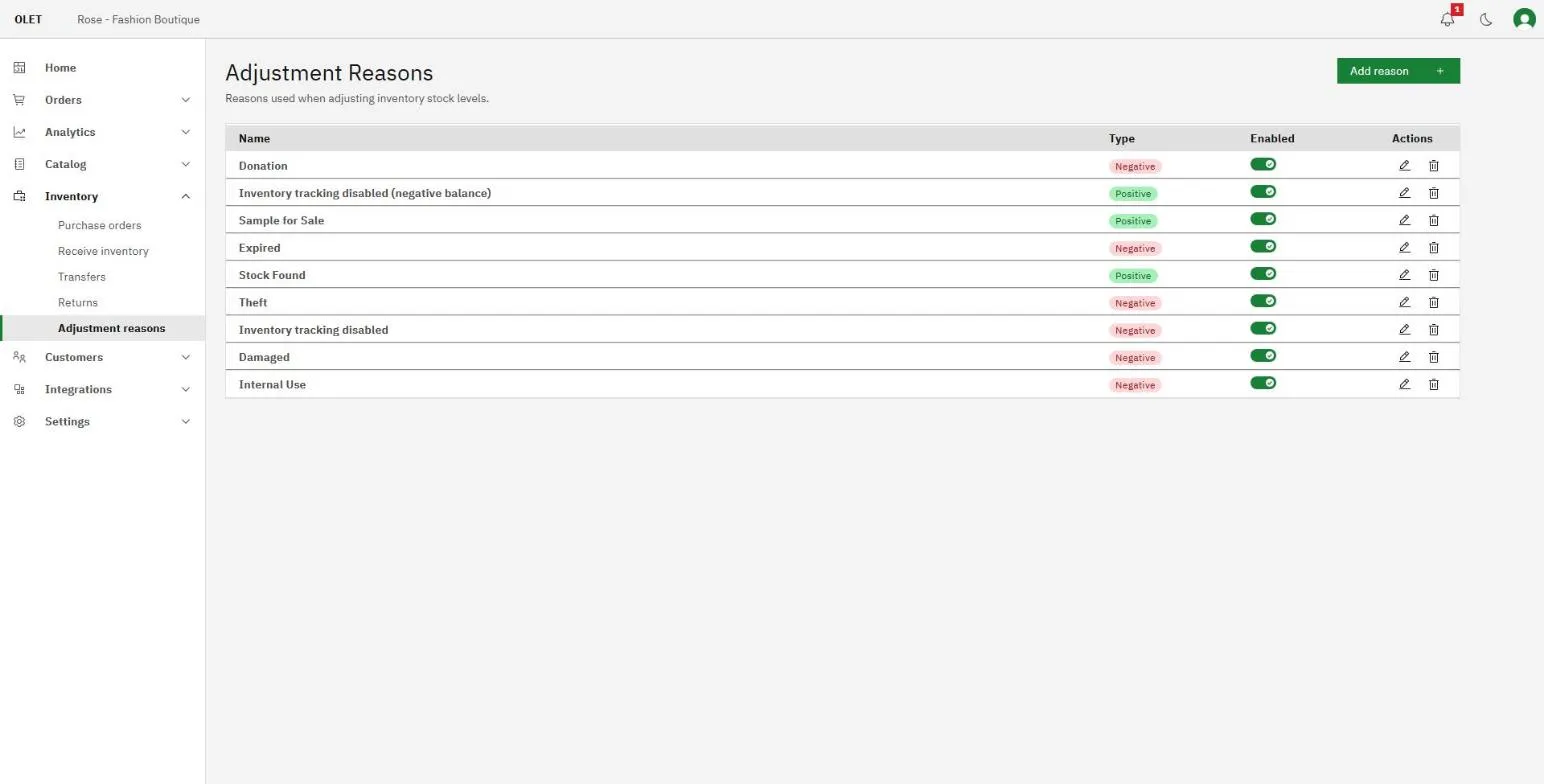
Select Add reason, give it a Name, and choose a Type:
- Positive, adds stock. Found stock, a correction upwards, a supplier freebie.
- Negative, reduces stock. Damage, theft, spoilage, a sample used in store.
The type is permanent. You can rename a reason later, but you cannot flip it from positive to negative, because every adjustment already recorded against it would change meaning. If you picked the wrong direction, switch that reason off and add the right one.
Reasons the system uses itself, for example for stock counts and write-offs, show in the list with a System tag. They cannot be edited, switched off or deleted, and they are not offered in the Reason list of Adjust stock.
Each row has a switch in the Enabled column. Switching a reason off hides it from the Reason list when someone makes an adjustment, and leaves every past adjustment that used it exactly as it was. That is what you want for a reason you have retired. A switched-off reason cannot be used for a manual adjustment at all.
Delete removes the reason outright. Switch it off instead unless it was created by mistake and never used.
If it goes wrong
Section titled “If it goes wrong”- The reason you want is not in the list. It is switched off, or it has not been created. Add or re-enable it on the Adjustment reasons page.
- The adjustment is refused. A removal cannot take an outlet’s stock below zero. Check the outlet’s current number on the product’s Inventory tab.
- You adjusted the wrong outlet. Make a second adjustment the other way on that outlet, then the correct one. Both stay in the history, which is honest about what happened.
What next
Section titled “What next”- Where stock numbers come from in the first place: How inventory works
- Booking in a delivery instead of adjusting: Receive inventory